How to ride a structured workout outdoors on a Wahoo ELEMNT
An ELEMNT can run a planned workout and follow a route on the same ride, and it does a good job of both. What it can’t do is check that the two belong together, so the threshold block can land on a descent and the recovery on the only climb. This guide covers how the ELEMNT handles workouts and routes, how to load both, and how to ride the result.
How the ELEMNT handles workouts and routes
On the ELEMNT, a structured workout is a plan: a list of intervals, each with a target and a condition that ends it, usually a time and sometimes a distance. A route is a course with turn-by-turn guidance. Both reach the device through the Wahoo app or a connected service, and the ELEMNT shows the current target while the route guides you.
Workouts get to Wahoo from several places: plans you build, platforms like TrainingPeaks that sync planned workouts to it, and apps that create routes and workouts in your Wahoo account. Whatever the source, the workout and the route are separate items that you pick separately on the device.
Sync before you leave
The ELEMNT pulls new routes and planned workouts when it syncs, over Wi-Fi or through the phone app. If you made a change in the evening and your ELEMNT hasn’t synced since, it won’t have the new version. Turn it on at home with Wi-Fi in range and give it a minute before you pick anything.
Pick the route, then the workout
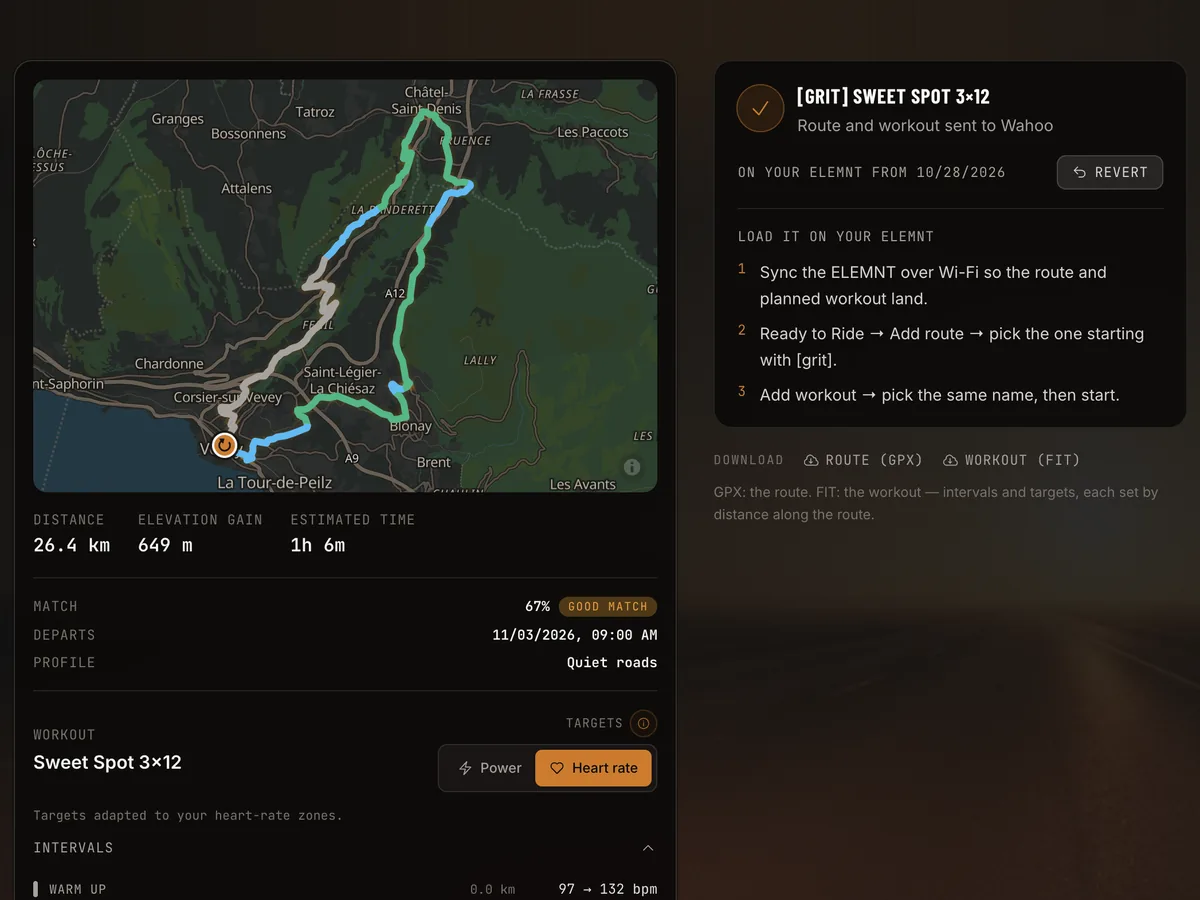
On the ELEMNT, from Ready to Ride:
- Add route, and pick the route.
- Add workout, and pick the workout.
- Start.
When both come from the same tool, give them the same name so you can’t mix up two similar plans on a busy morning.
Why steps that end by distance work better outside
Indoors, a step that ends after 8 minutes is fine because nothing interrupts it. Outdoors, a slower climb, a headwind or a red light shifts every later step along the road. After an hour, the plan and the terrain can be minutes apart.
A step that ends after a distance stays where it was planned: it starts at the foot of the climb and ends at the top. The cost is that its duration follows your speed. On a heavy-legged day, the interval runs a bit longer than written. If you like to see that coming, put distance to go for the current interval on your main page.
Riding the targets without ERG
Outside, the ELEMNT shows the target and you produce it with your gears and cadence. Don’t chase the instant reading. Short rises and gusts swing power by tens of watts from one second to the next. A smoothed power field, such as 3-second power, is easier to ride to, and the interval average is what counts afterwards. The trainer (ERG) workout guide covers pacing, stops and terrain in more detail.
If you train on heart rate, give each interval a minute before you judge it, because heart rate lags behind the effort.
After the ride
The ELEMNT uploads the ride to Wahoo, and from there to whichever services you’ve linked. Comparing the ride with the plan is easiest when the interval markers in the file line up with the efforts, which is one more reason to pick the workout before you roll out instead of starting it halfway.
A route and a workout that belong together
Gritmaps builds the route and the workout as one. Connect Wahoo under Settings → Integrations. Pick a built-in workout, import a .fit file, or take a planned workout from your Garmin Connect calendar or Intervals.icu. Gritmaps then finds a route whose climbs and flats carry the efforts, with fewer junctions inside the efforts. Press Send to Wahoo, and it creates the route, the plan (each step set by distance along the route), and a workout scheduled for the time you said you’d ride. Both carry a name starting with [grit].
Wahoo can also supply your FTP, and rides you record on the ELEMNT show up in your Gritmaps timeline with an analysis against the plan. Disconnecting Wahoo removes the upcoming workouts and plans Gritmaps sent. Generating routes is free, and sending them to your ELEMNT is part of Premium, free during the beta. Create your free account to try it.